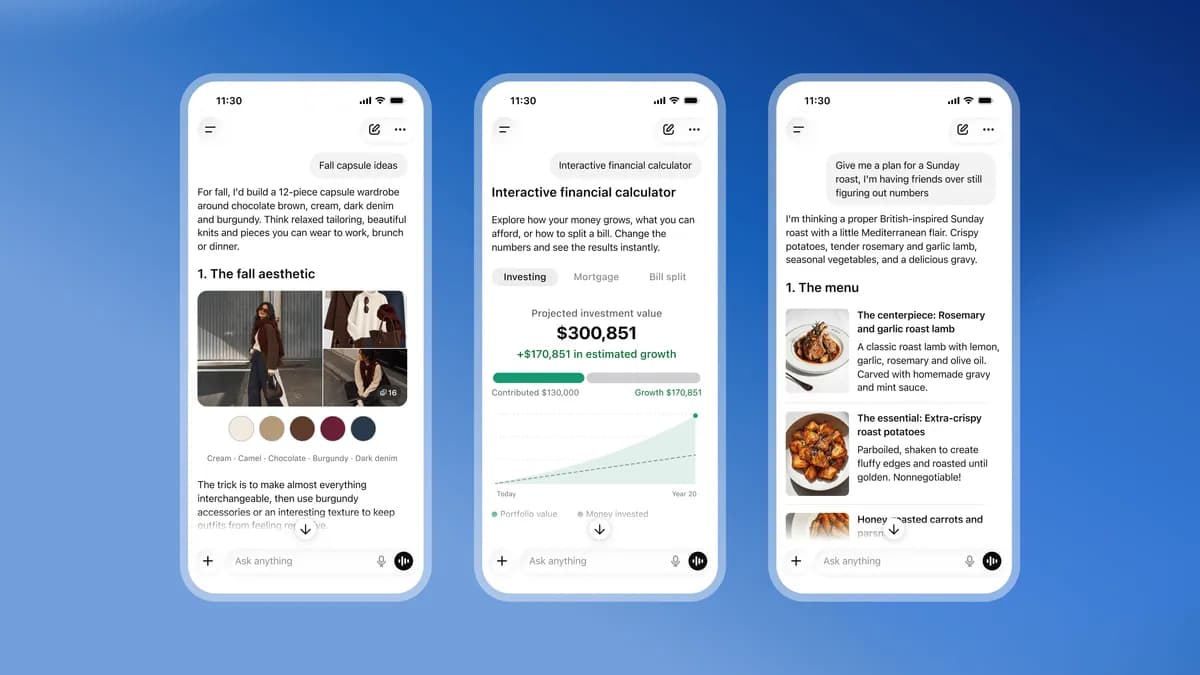
OpenAI has spent years building one of the most widely used AI products in history on a single, deceptively simple interface: a chat window. Type something, get text back. That paradigm is now changing. With the launch of ChatGPT Intelligent UI — rolled out simultaneously with GPT-6 — OpenAI is replacing the plain text bubble with something far more dynamic: a responsive canvas capable of delivering charts, diagrams, interactive buttons, and fillable forms alongside written answers.
The update signals more than a cosmetic refresh. It marks a deliberate repositioning of ChatGPT from a text-based assistant into an interactive information environment, one that competes not just with other AI chatbots but with the dashboards, reporting tools, and workflow applications that knowledge workers depend on every day.
What Is ChatGPT's Intelligent UI Feature?
The core premise is straightforward. When a user asks ChatGPT a question, the model now has the ability to respond with a combination of text and interactive visual elements — rather than returning a wall of prose that the user must mentally parse. OpenAI detailed the capability in a blog post accompanying the rollout, framing it as a new way for the model to communicate answers that benefit from structure, comparison, or exploration.
Think about how humans actually communicate complex information. A financial advisor doesn't recite numbers in a monologue; they slide a chart across the table. A project manager doesn't describe task dependencies in paragraphs; they draw a timeline. For decades, software has encoded that instinct into specialized tools: spreadsheets, BI platforms, project management dashboards. What ChatGPT Intelligent UI attempts is to make that kind of structured communication available on demand, generated dynamically from natural language, without requiring the user to know which tool to open.
The feature rolls out to all ChatGPT users, making it one of the broadest simultaneous releases OpenAI has executed.
Key Visual Elements: Charts, Diagrams, Buttons, and Forms

According to OpenAI's announcement, ChatGPT Intelligent UI supports several distinct types of visual output. Diagrams can illustrate relationships and processes. Charts can render comparative or trend-based data. Tappable buttons allow users to take action directly within the response — selecting an option, confirming a choice, or drilling deeper into a topic without retyping a new prompt. Forms extend that interactivity further, letting users input structured data as part of a back-and-forth exchange rather than cramming everything into a single text prompt.
Read next Laika's Wildwood: Stop-Motion Fantasy at TIFF 2026Each element addresses a specific friction point in the current chat experience. Charts solve the readability problem: when a response contains seven statistics, a bar chart is simply faster to interpret than a numbered list. Buttons collapse the distance between receiving information and acting on it. Forms allow multi-step workflows — booking, configuration, data collection — to happen inside the same interface where the question was asked.
The combination is significant. Previous attempts at enriching AI chat interfaces tended to add one visual layer: an image here, a structured table there. ChatGPT Intelligent UI treats the entire response surface as composable, mixing whichever elements best fit the content. That flexibility is what separates this from earlier incremental updates.
GPT-6 and Intelligent UI: A Paired Rollout

OpenAI chose to launch ChatGPT Intelligent UI alongside GPT-6, and the timing is unlikely to be coincidental. Pairing a new model generation with a new interface layer is a strategic statement: the two are designed to work together, not independently.
GPT-6 presumably brings improvements in reasoning, instruction-following, and content generation. But raw model capability only matters if the interface can express it. A more powerful model that still returns plain text is, from the user's perspective, only incrementally better. A more powerful model paired with a richer output surface — one that can decide when a chart serves the user better than a paragraph — is categorically different.
This pairing also serves a competitive function. The AI assistant market has grown substantially crowded since GPT-4 launched. Google's Gemini products, Anthropic's Claude, and a range of enterprise-focused tools all compete for the same users. A model upgrade alone might not cut through that noise. A visible, immediate change to how responses look and feel is harder to ignore. Users will notice ChatGPT Intelligent UI the first time they ask a comparative question and receive an interactive chart instead of a list.
Why This Update Matters for Everyday ChatGPT Users
Concrete scenarios clarify what this means in practice. A freelance consultant asking ChatGPT to help compare pricing models across three service tiers no longer needs to interpret a bulleted list — the model can generate a comparison chart directly. A student researching historical timelines gets a visual sequence rather than a paragraph dense with dates. Someone planning a home renovation project who asks about cost breakdowns sees a structured breakdown they can interact with, not just read.
The tappable buttons may prove to be the most transformative element for casual users. Currently, continuing a conversation requires composing a follow-up prompt — a low-effort task for experienced users but a genuine friction point for people who are less comfortable directing an AI. A button that says "Show me a simpler version" or "Break this into steps" removes that barrier entirely. The interface guides the next interaction rather than leaving it entirely up to the user.
Forms open a different category of use cases: anything that currently requires a user to provide structured information. Setting preferences, answering intake questions, providing context for a complex query — all of these become smoother when the model can present a form instead of asking clarifying questions one by one in text.
Broader Implications for the AI Interface Landscape
Analysts tracking enterprise software have been watching for signs that AI tools would begin displacing traditional business intelligence and reporting workflows. The argument has been building for some time: if a language model can generate a chart from a natural-language question, the specialized skills required to operate a BI platform — knowing which visualization type to choose, how to structure a query, how to configure a dashboard — become less essential.
ChatGPT Intelligent UI doesn't replace a mature BI platform outright. Those tools offer persistent data connections, governance controls, audit trails, and organizational sharing features that a chat interface doesn't replicate. But it does lower the threshold for casual, on-demand data exploration. A marketing manager who wants a quick breakdown of campaign spend doesn't need to wait for an analyst to pull a report — they can ask ChatGPT and receive a chart in seconds, assuming their data is accessible to the model.
Forrester Research has noted in recent years that the "citizen analytics" trend — non-technical workers generating their own data insights — was stalling partly because even simplified BI tools required more training than casual users received. Conversational AI interfaces that generate visualizations on demand represent a more natural fit for that use case than drag-and-drop dashboards. ChatGPT Intelligent UI is the clearest execution of that premise yet at consumer scale.
The interactive button layer also has implications for how AI products handle multi-step workflows. Every tappable option within a response is essentially a structured prompt pre-written by the model — a form of guided navigation that reduces the open-endedness of a chat interface without fully constraining it. Over time, this could make ChatGPT feel less like a raw tool and more like a directed experience, something closer to a smart application than a blank prompt box.
What to Expect as the Feature Rolls Out
OpenAI has confirmed the rollout reaches all ChatGPT users, which suggests a broad deployment rather than a phased beta limited to paid tiers. That said, the sophistication of Intelligent UI responses will naturally vary with the complexity and nature of queries. Not every message will produce interactive visuals — the model decides when a visual element serves the answer better than text alone.
Early users should expect an experience that evolves quickly. OpenAI has historically iterated on interface features based on usage patterns, and interactive elements generate clearer behavioral signals than plain text: a button either gets tapped or it doesn't. That feedback loop should accelerate refinement.
For developers and enterprise customers, the more interesting question is whether Intelligent UI capabilities will extend to the API — allowing third-party applications to render ChatGPT's chart and form outputs natively within their own products. OpenAI has not confirmed this direction, but it represents the logical next step for a company that has built a substantial developer ecosystem alongside its consumer product.
What's already clear is the direction OpenAI is pointing toward: an AI assistant that doesn't just answer questions but presents answers in the format best suited to the question. That shift, modest as it might sound, is a meaningful departure from where conversational AI began — and a credible preview of where it's headed.
Source: The Verge