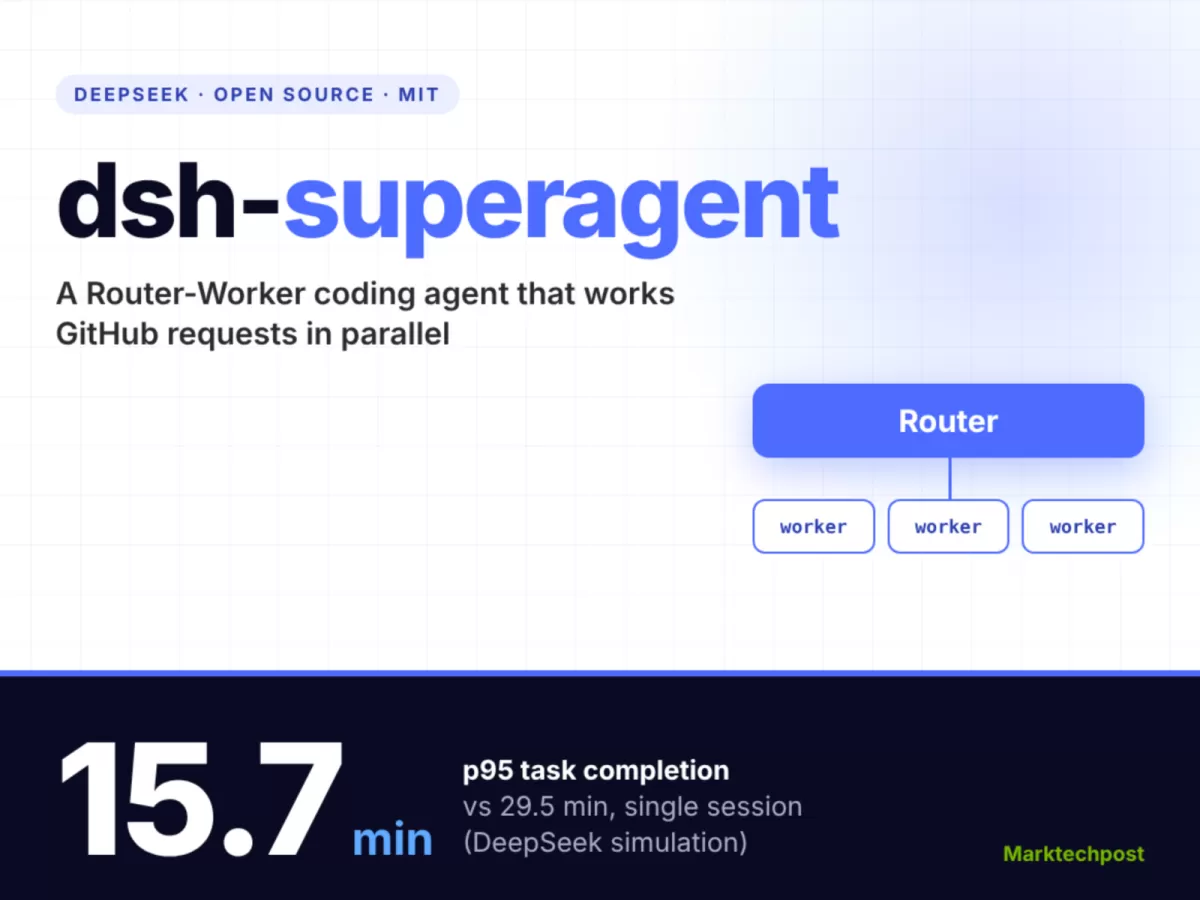
DeepSeek's DeepSeek Harness team released dsh-superagent, an MIT-licensed research prototype, according to a MarkTechPost report published on 1 November 2026. It is a proactive coding agent for one GitHub repository that turns allowed requests into parallel work items. DeepSeek's own simulation put its p95 task time at 15.7 minutes, against 29.5 minutes for a single-session baseline.
What is dsh-superagent and what does it do?
dsh-superagent is a TypeScript bundle, version 0.1.0, that DeepSeek packages for DeepSeek Harness. According to MarkTechPost, the release was a single commit under the MIT licence, and the agent uses whatever model the Harness profile is set to.
The agent waits to be asked. It listens to GitHub and, optionally, to Feishu. When a person on an allowed list addresses it, the agent opens a work item called a Ticket. Each Ticket runs in its own session and its own directory. Results return to the original conversation, often as a pull request. A local web panel shows only the items that need a person.
The project's README states the core rule: take as little human attention as possible while giving as much value as possible. According to the source, the agent confirms a request once, stays quiet while it works, and writes again only when it has a result, a question or a failure.
How does the Router-Worker design handle requests?
The design has two layers. A long-running Router handles conversation and dispatch. Isolated Worker sessions do the actual work. The source describes the flow in the prototype's domain model as follows:
- Source and Trigger: GitHub or Feishu produces events.
- Eval: decides whether a batch of Triggers asks for new work.
- Ticket: a unit of authorised work, with an immutable Mandate that states why it may proceed.
- Subscription: later comments on a pull request reach the right Worker without a new mention.
The main session runs a preset called dsh-superagent-router with a smaller tool set. Each Worker runs dsh-superagent-worker. According to the execution documentation, shell commands move to the background after 5 seconds, so Workers can keep receiving messages while a command runs.
Is the proactive mode safe to switch on?
Proactive work is gated. The authorisation documentation defines three accept modes: off, observe and auto. observe is the default. In that mode, the agent only records what it would have accepted, so a team can review its judgement before letting it act.
The source also notes that the agent runs with full access to the operating-system user it runs as. For that reason, MarkTechPost advises isolating it before use. The research team lists further ideas beyond the prototype, including an external Watchdog, separation of storage and compute, and an asynchronous ReAct loop. The source does not say when, or whether, any of these will ship.
What did DeepSeek's simulation measure?
DeepSeek tested the system with simulated group-chat and GitHub CI message streams. According to ifeng's account of the report, each run contained about 300 messages, of which about 20 were real work requests, and each scheme ran five times.
- Super-agent: p50 of 12.4 minutes and p95 of 15.7 minutes.
- Single session with subagents, neutral prompt: p95 of 29.5 minutes. The source gives no p50 for this baseline.
- Under the neutral prompt, the baseline called a subagent 0 times across 5 runs.
As arrivals rose from about 1 to 40 per minute, the Router's batch size grew from 1.0 to 2.8, and per-request latency rose from 2.5 to 3.9 seconds. An ablation that removed direct event pass-through raised Router decisions by about 30% and cache-read tokens by about 37%, from 23.23M to 31.77M. All of these figures are self-reported.
The source also says the tests used synthetic messages and simulated tools. It does not report how well the generated code worked, so the speed results do not show that the code is better.
What do you need before you install it?
The source says the agent runs on your own machine as a dedicated DeepSeek Harness profile. It lists these requirements:
- Node.js 22.19 or later, or Node.js 24 or later
- git 2.32 or later
- Python 3.8 or later
- tmux
- GitHub CLI 2.48 or later
The first practical step is to set up DeepSeek Harness and create a dedicated profile for dsh-superagent, as the source describes. The source does not reproduce the install commands. The README, the setup guide and the design documents linked from the repository are the places to find them.
Who it is for and where it falls short
The project suits teams that already run DeepSeek Harness and want an agent to watch one repository and handle authorised requests in parallel. Keep the default observe mode until you have reviewed what it would have accepted. Keep the agent's account limited, because it has broad access to the operating-system user.
It is a research prototype, not a production product. The source does not report release history, maintenance activity or adoption figures beyond the single initial commit. It also does not compare dsh-superagent with other GitHub coding agents, so you cannot judge its relative merit from the article. Teams that need measured coding quality will need their own tests on their own repositories.
Bottom line: Treat dsh-superagent as a research prototype to evaluate in observe mode on a non-critical repository. The speed figures come from DeepSeek's simulation, so run your own tests before you rely on it.
Source and verification: This article is based on a MarkTechPost report published on 1 November 2026, which summarises DeepSeek's release and design post. Some figures come from ifeng's account of the report. The project's own README, setup guide and design documents are the primary sources, and the MarkTechPost report is linked at MarkTechPost. No GitHub repository figures were supplied for this article.
Related: NVIDIA Auto Ontology: Open Semantic Layer for AI Agent SQL · datasette-llm 0.1a9 Now Uses LLM's Default Model

Comments (0)