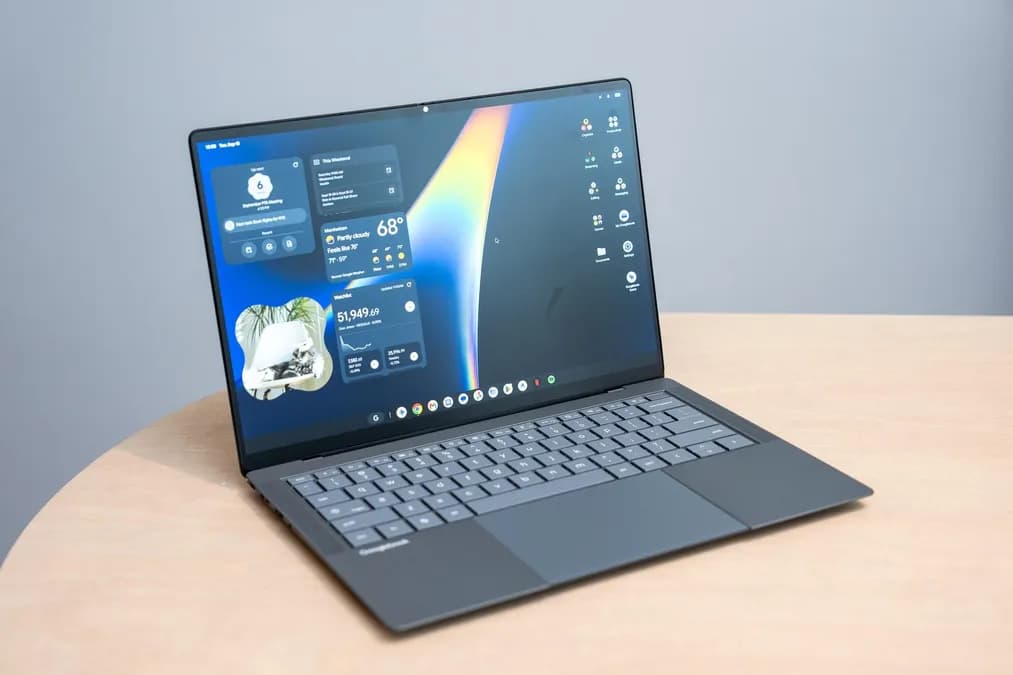
Five Android laptops arrived on store shelves October 4th, 2026. Twenty-four hours of hands-on testing later, one thing is clear: Googlebooks represent a genuinely interesting bet on the future of personal computing — and a reminder that first-generation hardware from Google rarely ships fully formed.
We received review units of all five Googlebooks shortly after launch and have spent every available hour since pushing them through their paces. These are early impressions, not a final verdict. But 24 hours is enough time to develop a firm sense of where this new device category earns its excitement and where it still needs to grow up.
What Are Googlebooks and Why Do They Matter
Android commands roughly 72 percent of the global smartphone operating system market, according to StatCounter's most recent data. That figure has held stubbornly dominant for years, representing billions of users who already know how to navigate Android apps, gestures, and the Google ecosystem. Googlebooks are Google's attempt to transfer that familiarity into laptop form — Android-powered machines designed, apparently, to blur the line between the phone in your pocket and the computer on your desk.
The five launch partners — Dell, Acer, Asus, Lenovo, and HP — are not fringe players. They collectively account for a substantial portion of global PC shipments tracked by IDC and Canalys each quarter. Their involvement signals that this is not a science project. Googlebooks are a coordinated hardware push backed by the same OEM relationships that made Chromebooks a $10 billion+ market segment over a decade.
Why does that matter now? Because the PC market is under sustained pressure. IDC has repeatedly noted softer demand across traditional Windows notebooks, and Canalys analysts have flagged that PC vendors are actively hunting for differentiated form factors to move units. An Android laptop backed by Google's first-party software stack, distributed through established OEM channels, arrives at a structurally opportune moment.
First Impressions: Five Googlebooks Tested
All five review units came in within roughly 24 hours of each other, which meant an immediate triage: unbox everything, power them on, and start testing in parallel. The machines span a range of price points and form factors — a deliberate strategy that mirrors how Chromebooks launched in 2011 and 2012, when Google seeded the market with multiple OEM partners rather than a single reference device.
Read next Laika's Wildwood: Stop-Motion Fantasy at TIFF 2026The build quality across the lineup varies noticeably. Some units feel premium: tight hinge tolerances, keyboards with satisfying travel, displays that hold up in a moderately bright room. Others feel more entry-level, with chassis flex and trackpads that suggest corners were cut to hit a target price. That spread is expected at launch — Chromebook's early hardware ranged from forgettable plastic to genuinely impressive — but it means "Googlebook" is not yet a consistent quality signal the way "MacBook" is.
Setup was faster than anticipated. The Android-native onboarding flows feel familiar to anyone who has set up a Pixel phone in the last few years. Signing in with a Google account pulled app preferences and bookmarks into place within minutes. That friction-free start is one of the category's genuine early wins.
Where Googlebooks Shine Early On
The Android app ecosystem is the obvious headline advantage, and in practice it delivers. Apps that feel cramped on a phone screen — note-taking tools, drawing applications, certain productivity suites — breathe on a larger display. Touch input on the Googlebook displays worked consistently in our testing, with palm rejection handling better than expected during extended typing sessions.
Battery endurance is a notable bright spot. Android has been optimized for mobile power efficiency for over a decade, and that heritage shows. Across the five units, screen-on time during mixed usage — browsing, email, video playback — was consistently strong, tracking ahead of comparably priced Windows machines in our informal assessments. If battery life is your primary concern, Googlebooks start with a structural advantage baked into the operating system itself.
Google's own apps are, predictably, excellent on Googlebooks. Chrome, Gmail, Google Docs, YouTube, and Google Meet feel native because they are native. For users already embedded in the Google workspace — which, given Android's market penetration, is a large percentage of potential buyers — the experience has an out-of-the-box cohesion that takes Windows laptops significant setup time to replicate.
The Rough Edges: Where Googlebooks Feel Underbaked
Twenty-four hours of testing also surfaces the friction. The most consistent issue across all five units involves app scaling. Android was built around portrait-oriented, touch-first screens. Many apps handle landscape widescreen layouts gracefully; others do not. Stretching a phone-native interface across a 14-inch display can produce wide empty margins, awkward button placements, or navigation bars that feel misaligned with how a trackpad user actually navigates.
This is not a new problem. Microsoft encountered similar scaling challenges when it pushed Windows RT onto ARM tablets in 2012, and the resulting app inconsistency contributed to that platform's stagnation. Google has had longer to address Android's desktop shortcomings than Microsoft had with RT, but the evidence from 24 hours of testing suggests the work is not finished.
Multitasking also reveals stress points. Snapping two apps side by side is possible, but the experience is inconsistent depending on which apps are involved. A productivity workflow that requires bouncing between a spreadsheet, a browser, and a communication tool — the kind of workflow that defines a laptop's daily utility — sometimes feels like it's working around the operating system rather than with it. Chromebooks, ironically, handle split-screen multitasking more predictably in many cases because ChromeOS was designed with desktop windowing in mind from the start.
Peripheral compatibility deserves a mention. External monitor behavior, USB-C hub performance, and Bluetooth device handshakes produced mixed results across the five units during our testing window. Some configurations worked immediately; others required workarounds. At this stage, power users should temper expectations.
How Googlebooks Compare to Chromebooks and Windows Laptops
The Chromebook comparison is the one that will follow Googlebooks for years. Chromebooks launched in 2011 to skepticism, found a foothold in education and value segments, and eventually shipped hundreds of millions of units. The trajectory took time — it was not until the mid-2010s that Chromebooks became a fixture in IDC's quarterly PC reports with meaningful market share. Googlebooks are entering a market that is both more mature and more competitive.
Against Windows laptops at comparable price points, Googlebooks trade Windows application compatibility for Android ecosystem depth. That is a significant trade. Professional software — specialized creative tools, enterprise line-of-business applications, legacy productivity suites — largely does not exist in Android laptop form. For users whose workflows depend on that software, Googlebooks are not a serious option today.
Against Chromebooks, Googlebooks offer a richer app catalog and more natural continuity with Android phones. But ChromeOS has had 15 years of desktop refinement. Googlebooks have had 24 hours of public availability. The gap in polish is real and expected.
Should You Buy a Googlebook Right Now?
The honest answer is: it depends on who you are. For an early adopter who lives inside the Google ecosystem, primarily consumes content, and values battery life and Android app availability over deep multitasking, a Googlebook may genuinely serve you well from day one. The setup experience is smooth, the battery performance is promising, and the touch-first interface works.
For anyone whose laptop is a primary work machine running specialized software, the category is not ready. The app scaling inconsistencies, the multitasking friction, and the peripheral compatibility questions are real limitations at launch — not theoretical concerns.
Canalys and IDC analysts have consistently noted that new PC form factors take two to three hardware generations to find their footing in the market. The first Chromebooks were not the Chromebooks that eventually sold in volume. The same learning curve almost certainly applies here.
Googlebooks are worth watching closely. The foundation — Android's efficiency, Google's ecosystem, established OEM distribution — is strong. What remains is the refinement work that separates a compelling product category from an exciting prototype. After 24 hours, the excitement is real. So is the sense that this hardware needed more time in the oven.
Source: The Verge